Lab / Lab 06
Home lab
The home lab started in February as a Raspberry Pi blocking adverts. It now does the quiet work behind everything else on this page: it stores my music and sample library, backs everything up overnight, streams games from the PC in the other room, and lets me reach all of it from my phone. Every session is written up in a log, so I can always pick up where I left off.
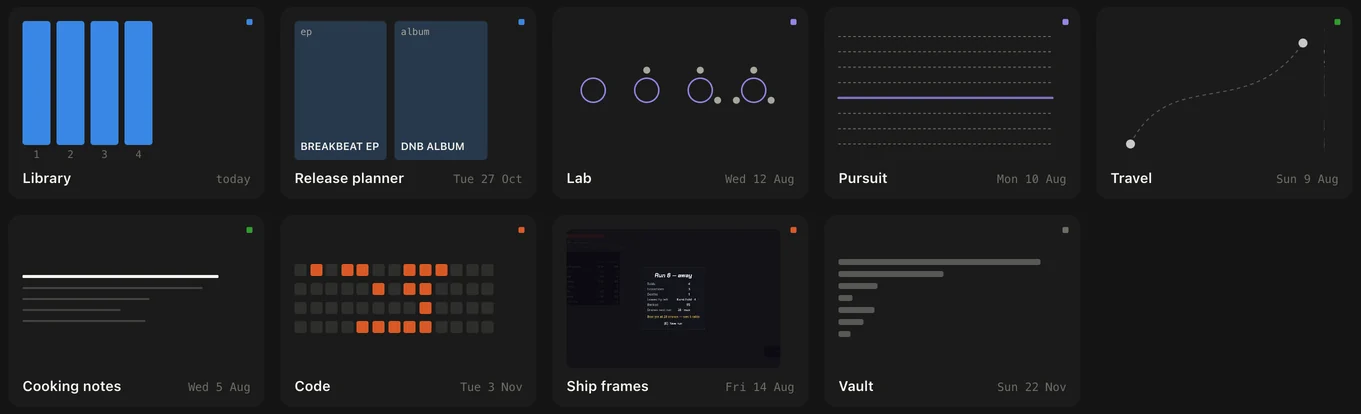
The dashboard
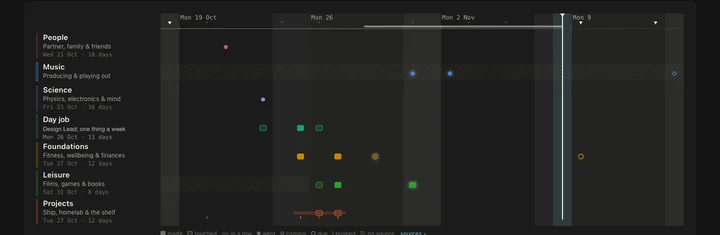
I designed a dashboard to see all of it in one place. It has four views: today, a timeline of my week, a set of tools, and a status page for the machines.
The timeline shows seven areas of my life as rows on one ruler, with a playhead for today, like the arrangement view in a music app. Each dot is something done. The tools are small apps I use every week: a player for my sample library, a release planner for my music, a log of Project Ship's frames, code activity across my projects, and my notes.
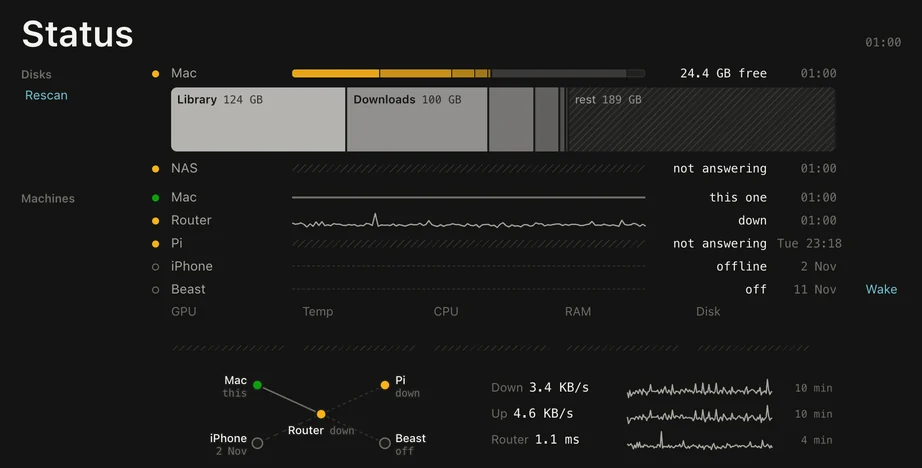
The status page
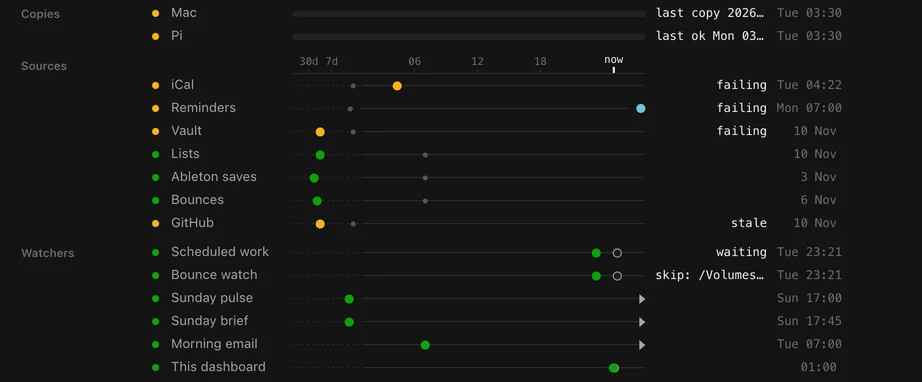
The status page shows every machine, every data source and every scheduled job, and how fresh each one is. Its main design rule is that it never goes blank.
When something stops answering, the page keeps the last thing it knew, greys it out and says when it was last seen. These captures were taken on 25 November while the Pi was offline, so you can see that rule working: the Pi, the NAS and everything that reads from them are marked, while the jobs that run on the laptop carry on as normal.
Each source and job sits on a timeline running from 30 days ago to now, so a job that has quietly stopped running is obvious at a glance. Polling the Pi every two seconds was only possible after reusing a single SSH connection, which took each check from 560 ms to 50 ms.
Game streaming
The gaming PC lives in another room and streams to my laptop instead. One icon in the dock wakes it up and opens the stream.
- Stream
- 2560 × 1600
- Encoder load at 144 fps
- 88%
- Steps to play
- 1 click
For weeks the stream went black whenever the PC had been idle. It looked like the lock screen, but the cause was the monitor: when it powered off, the graphics card lost its only display, Windows replaced it with a phantom low-resolution screen, and the streaming software had nothing to capture. I fixed it without new hardware by installing a virtual display that is always there, set to the laptop's resolution, with a small scheduled task to apply the setting inside Windows.
Before tuning the picture I measured it. Streaming at 2560 × 1600 and 144 frames a second, the graphics card's encoder was already at 88%, so there was no room for a higher quality setting. One setting I tried made some frames too large for the stream's error correction and caused stutter, so I reverted it. Streaming at 120 frames a second matches the laptop's display and leaves the encoder headroom.
The last piece was waking the PC. Wake-on-LAN worked after a restart but not after a shutdown, because Windows' fast startup is really a kind of hibernation and was switching the network card off. With that turned off, a small dock app asks the Pi to wake the PC, waits for it to be ready and opens the stream.
Remote access
My phone reaches the Pi over a private VPN that connects directly rather than through a relay. From there I can read the dashboard and start an agent session on the laptop.
In September, sessions started from my phone began hanging on "allocating sandbox". The server that starts them had been running for three weeks from a version of the app that an automatic update had since deleted. It still reported itself as connected, so nothing looked wrong, and because it never crashed, nothing restarted it. A small watcher now checks that the server is running the current version and restarts it when it isn't and nothing is in progress.
Matrix
Before the dashboard there was Matrix, a personal tracking system I built in 2025. It recorded a lot and helped very little.
Five background agents recorded which app I was using, what music was playing, my Claude sessions, my calendar and my code changes. Every two hours a set of insight scripts read through the events and left a briefing for when I opened a terminal. It grew from a simple tracker into a 2,160-line rules engine, and then into smaller modular scripts.
By October 2026 it had a gigabyte of logs, one agent had been relaunched 171 times because its file had been renamed, and I had stopped reading the briefings. I removed it with a script that showed what it would do before doing it, and switched things off rather than deleting them. I wanted my evenings back for making music, and the useful parts went into the dashboard and the agent harness.
Field notes
The bugs that taught me the most. In each case the first explanation was wrong.
Storage
"My drive got wiped"
It hadn't been. Three things had stacked up: the Pi looked up its own name through the ad blocker running on itself, the drives weren't getting enough USB power and dropped off, and old mount points opened as empty folders. Nothing was lost; it was all hidden.
Storage
Copies that arrived empty
Copying to the NAS left empty files, while reading from it worked. The share stored Mac file information in a way the drives' file system doesn't support, and only writing needed it.
Storage
"The Pi is slow" was Ableton
The file server reported an error after creating a folder, so Ableton tried again with the next number, 727 times. Listing that folder kept the server busy. One line of configuration fixed it.
Network
Wi-Fi broke some apps but not Chrome
After I unplugged Ethernet, the Mac kept looking up addresses through the disconnected adapter. Chrome has its own lookup, so it worked; Spotify and my agent tools didn't.
macOS
The NAS wasn't down
Scheduled jobs got "permission denied" on the network drives and looked like broken mounts. macOS privacy permissions belong to signed apps, and a plain script has none, so the jobs now run inside a small signed app.
Tools
The checker was the leak
A frozen laptop led me to 28 Chrome processes using 2.3 GB. They were left behind by the tool the agents use to check web pages, whenever a timeout stopped it before it could clean up.
What I learnt
- The first explanation is usually wrong. The black screen wasn't the lock screen, the wiped drive wasn't wiped, and the slow Pi was my music software.
- Measure before tuning. The encoder reading told me more than any guide to quality settings.
- Infrastructure has a user experience too. Three machines are involved in starting a game; from my side it's one click.
- Show stale data honestly. A page that greys out and says how old its information is, is more useful than one that empties itself.
- Systems can become the hobby. I tend to build systems when things feel chaotic. The best version of this lab is the one I simplified.